NEW Now with bulk import & quick scan modes — extract leads from any website

Free Chrome Extension No Sign-up Required

Extract leads from Google Maps & any website

Scrape businesses from Google Maps, scan any website for contacts, or import URLs in bulk. Get emails, phones, and social profiles — then export to Excel. No coding required.

SuperLead Pro demo — click to play

Works with all Chromium-based browsers

Chrome
Brave
Edge
Opera
Vivaldi
Features

Everything you need to
generate leads at scale

Four powerful modes to extract business data from Google Maps, any website, single pages, or bulk URLs — then enrich with real emails and social profiles.

Maps + Web Scraping

Search any niche on Google Maps and instantly extract business names, phone numbers, websites, ratings, reviews, and addresses. Works on any Google Maps search result page.

Email & Social Enrichment

Automatically visit each business website to extract emails, LinkedIn, Instagram, Facebook, TikTok, Twitter, and YouTube profiles. All enrichment happens locally in your browser.

Quick Scan — Any Website

Visit any website — a competitor, a prospect, a local business — and extract emails, phone numbers, and all social media links with one click. No setup needed.

Alt + S Instant scan on any page

Bulk URL Import

Paste a list of website URLs and extract contact data from all of them in batch. Perfect for processing prospect lists at scale.

Filter, Tag & Organize

Filter by rating and review count. Add notes and tags like "Hot Lead" or "Follow Up" to organize your pipeline directly in the extension.

Excel & CSV Export

Export your leads to formatted Excel files with styled headers, auto-sized columns, and clean URLs — or CSV for quick imports into any CRM.

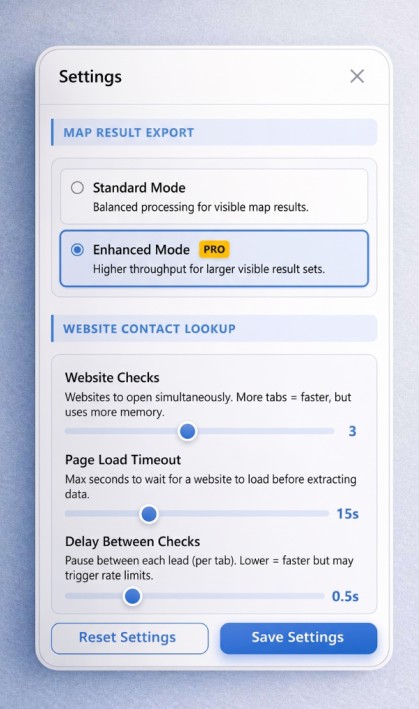
Total Control Settings

Choose your Scraping Speed (Careful to Fast) based on your internet connection. Decide how many websites to extract data from simultaneously using parallel tabs.

Customizable settings panel showing speed and parallel tab controls
feature-setting.jpeg

Stunning Light & Dark Modes

Work comfortably day or night. SuperLead Pro seamlessly switches between a crisp light UI and a sleek dark mode built for power users.
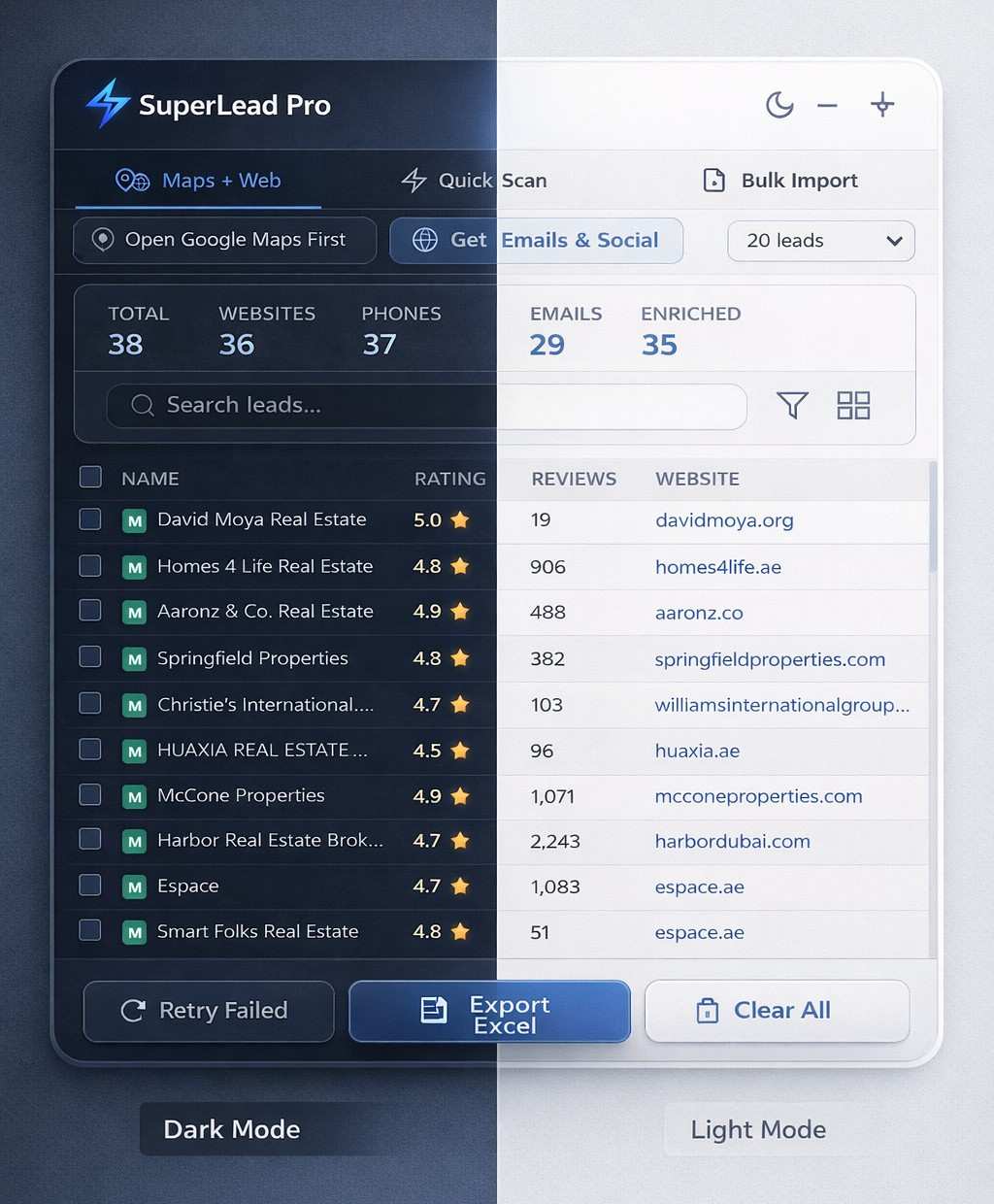
SuperLead Pro dark mode on left, light mode on right
feature-dark-ligh.jpeg
How It Works

From search to spreadsheet
in under 60 seconds

1

Search or browse

Open Google Maps, visit any business website, or paste a list of URLs.

2

Extract & enrich

Click scrape or press Alt+S. SuperLead Pro pulls names, phones, emails, and socials automatically.

3

Export to Excel

One click exports your leads to a formatted Excel file with styled headers and clean data.

Data You Get

Every data point you need
to close your next deal

Business Name
Phone Number
Website URL
Email Address
Rating & Reviews
Full Address
LinkedIn
Instagram
Facebook
YouTube
Twitter / X
TikTok
Pricing

Start free, upgrade when you're ready

SuperLead Pro is free to use. Get lifetime access to unlock unlimited enrichment and priority features.

Free

Perfect for trying it out

$0 forever
  • Google Maps scraping
  • Email & social enrichment
  • Bulk URL import & Quick Scan
  • Up to 20 leads total in workspace
  • Basic export (CSV)
Install Free Extension
50 early-bird spots remaining

Price increases to $49 when spots run out

FAQ

Frequently asked questions

Everything you need to know about SuperLead Pro.

Yes! The core Google Maps scraping feature is completely free with no sign-up required. You can scrape up to 20 leads per session, use Quick Scan mode, and export to CSV — all for free, forever. The paid Lifetime Pro plan unlocks unlimited leads, email enrichment, bulk import, and Excel export.

SuperLead Pro extracts business name, phone number, website URL, full address, rating, review count, and category from Google Maps listings. With enrichment enabled, it also extracts emails, LinkedIn, Instagram, Facebook, Twitter, TikTok, and YouTube profiles from business websites.

Scraping publicly available data is generally legal. SuperLead Pro only extracts information that is publicly visible on Google Maps and business websites. We recommend using the data responsibly and in compliance with applicable laws in your jurisdiction, including GDPR and CAN-SPAM regulations.

SuperLead Pro works on all Chromium-based browsers including Google Chrome, Microsoft Edge, Brave, Opera, and Vivaldi. Firefox is not currently supported as the extension uses Chrome's Manifest V3 APIs.

After scraping leads from Google Maps, click "Get Emails & Social." The extension opens each business website in background tabs (configurable concurrency), scans the HTML for email addresses and social media links, then saves everything to your lead list. No external API or third-party service is used — everything happens locally in your browser.

One payment, no subscriptions, no monthly fees. You get access to all current and future features forever. This includes all updates, new data extraction capabilities, and priority support. The early-bird price of $9 (regular $49) is available for the first 50 customers only.

Ready to generate leads on autopilot?

Join 2,400+ marketers who use SuperLead Pro to build their pipeline from Google Maps and the web.

Free forever. No sign-up required. Upgrade anytime.